官网:https://docs.github.com/en/actions
github需要一个密钥,读写仓库权限
并且触发方式需要修改一下:
- 进入 Settings > Pages。
- 在 Build and deployment 区域下:
- 将 Source (来源) 更改为 Deploy from a branch。
- 确认 Branch (分支) 选择 master,并且文件夹选择 / (root)。
- 点击 Save (保存)。
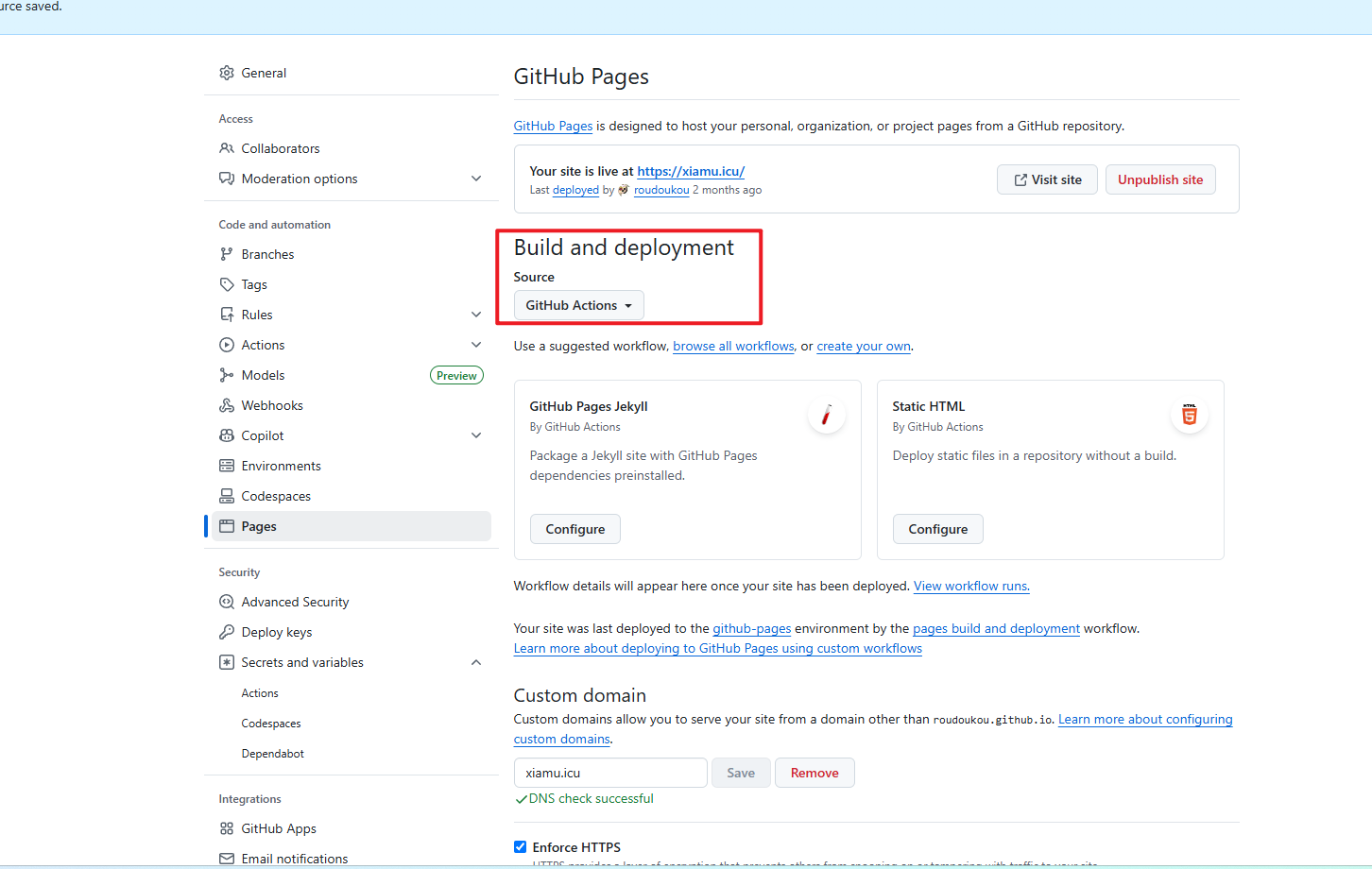
账户 - Settings - Developer settings - Personal access tokens - Fine-grained tokens - DEPLOY_TOKEN
然后hexo的根目录创建 /.github/workflows/hexo-deploy.yml 如下yaml
1
2
3
4
5
6
7
8
9
10
11
12
13
14
15
16
17
18
19
20
21
22
23
24
25
26
27
28
29
30
31
32
33
34
35
36
37
38
39
40
41
42
43
44
45
46
47
48
49
50
51
52
53
54
55
56
57
58
59
60
61
62
63
64
| name: Deploy Hexo Site
on:
push:
branches:
- master
jobs:
build-and-deploy:
runs-on: ubuntu-latest
steps:
- name: Checkout Source
uses: actions/checkout@v4
- name: Set up Node.js
uses: actions/setup-node@v4
with:
node-version: "16"
- name: Cache dependencies
uses: actions/cache@v4
with:
path: ~/.npm
key: ${{ runner.os }}-npm-${{ hashFiles('**/package-lock.json') }}
restore-keys: |
${{ runner.os }}-npm-
- name: Install Dependencies
run: npm install
- name: Replace Source Link
run: |
sed -i "/let out = '<a href=\"';/i \
\ \n\tif (\!href.startsWith(\"http\")) { \
\n\t href = href.replace(\"/source\", \"\"); \
\n\t}" node_modules/hexo-renderer-marked/lib/renderer.js
- name: Replace Source Images
run: |
sed -i '/image(href, title, text) {/a \
\tif (href.indexOf("/source") > -1) { \
\t href = href.replace("/source", ""); \
\t}' node_modules/hexo-renderer-marked/lib/renderer.js
- name: Generate Static Files
run: npm run build
- name: Deploy to Repository xiamu
uses: peaceiris/actions-gh-pages@v4
with:
personal_token: ${{ secrets.HEXO_BLOG_XIAMU_DEPLOY_TOKEN }}
publish_dir: ./public
external_repository: roudoukou/roudoukou.github.io
publish_branch: master
keep_files: true
user_name: "GitHub Actions"
user_email: "actions@github.com"
commit_message: "Deploy updates"
|
/.github/dependabot.yml
1
2
3
4
5
6
7
8
| version: 2
updates:
- package-ecosystem: npm
directory: "/"
schedule:
interval: daily
open-pull-requests-limit: 20
|